The Griffeath demons
A few days ago I met up again with my friend Jorge Portillo to play some board games.
Jorge and I have known each other since secondary school, we were companions on Dungeons and Dragons adventures, and we crossed paths again studying Computer Engineering at the Universidad Complutense.
After a game of Formula D the memories of our younger days came out once again, and Jorge pulled a few printed pages out of a drawer. "Let's see if you remember this," he said, as he showed me a dot-matrix printout on fanfold paper.
It was the listing of a program. The header carried the date: 29 April 1994. At 5:42 PM, to be precise.
Welcome to 1994
We could not even remember what the devil that listing was. By the look of the code it had to be Pascal or Modula-2, the languages we were using at university in those years. Yes, on a closer look it was Pascal, and we would surely have used Turbo Pascal to write it. And sure enough, it was a demon — or at least that was the program's title.
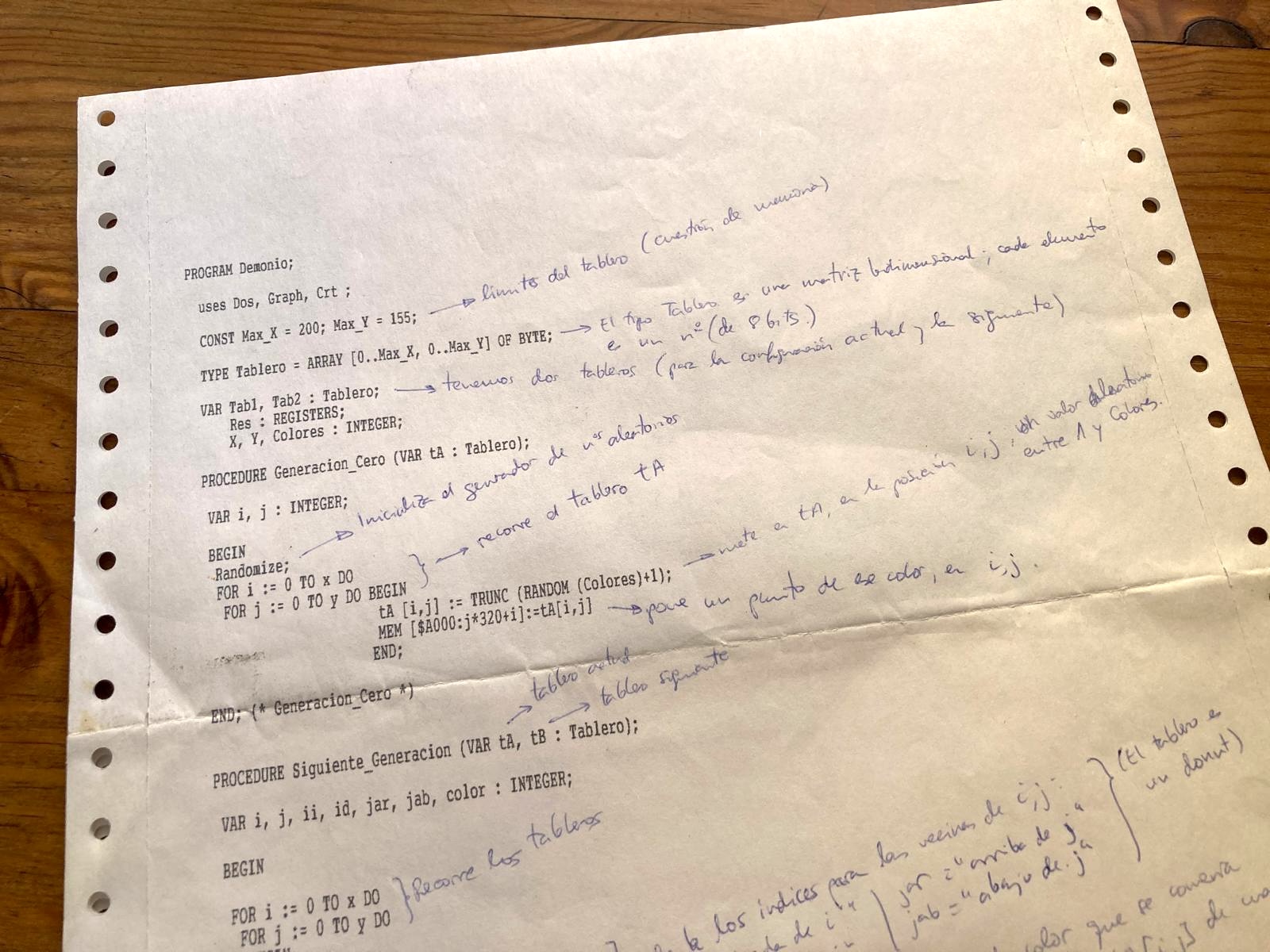
The code was short and easy to understand, and full of comments in blue biro. And a fairly simple implementation, which made it easy to read. An opening procedure generated a 2D board with random numbers standing for colours. And then an endless loop that worked out the next generations of colours from a few simple rules.
All right, this was starting to ring a bell... some sort of cellular automaton, most likely, but let us not get ahead of ourselves. I thought the nicest thing would be to make the most of this trip into the past and savour it: write the code again... in Turbo Pascal itself. Like the old days.
DOSBox, the time machine
Several decades have gone by since we printed that listing in the faculty lab, and everything has changed enormously.
How does one write Pascal these days? It turns out there are a few options. There is Turbo Pascal Online, for one, an IDE that runs straight in a web browser. It is very good, but it only offers text mode, and this program switched to VGA graphics. When Turbo Pascal was left behind by the arrival of Delphi, in the middle of the nineties, Free Pascal came along, and it is still maintained today.
Switching into VGA mode was not trivial: you had to call the BIOS to select mode
13h, loading the registers ah := 0, al := 19 and firing interrupt 10h.
The truth is I did not remember any of this any more, and it was certainly not
going to work on my Mac. I needed a PC running MS-DOS. I did not have one to
hand, so I went for the most practical way of doing it: emulation, with
DOSBox.
Now I had all the pieces. Back in the MS-DOS of 1994, I installed Free Pascal, an IDE much like Turbo Pascal, and I could finally type in the code from the printed listing. For reference, here is the complete code, in all its student simplicity:
PROGRAM Demonio;

uses Dos, Graph, Crt;

CONST Max_X = 150; Max_Y = 150;

TYPE
  Fila = ARRAY [0..Max_X] OF BYTE;
  Tablero = ARRAY [0..Max_Y] OF Fila;

VAR Tab1, Tab2: Tablero;
    Res: REGISTERS;
    X, Y, Colores: INTEGER;

(* Generacion Cero*)

PROCEDURE Generacion_Cero (VAR tA : Tablero);

VAR i, j : INTEGER;

BEGIN
  Randomize;

  FOR i := 0 TO x DO
    FOR j := 0 TO y DO BEGIN
                         tA[i,j] := TRUNC(RANDOM(Colores)+1);
                         MEM[$A000:j*320+i] := tA[i,j]
                       END
END;

(* Siguiente Generacion *)

PROCEDURE Siguiente_Generacion (VAR tA, tB : Tablero);

VAR i, j, ii, id, jar, jab, color: INTEGER;

BEGIN
  FOR i := 0 TO x DO
    FOR j := 0 TO y DO
      BEGIN
        IF i = 0 THEN ii := x ELSE ii := i-1;
        IF i = x THEN id := 0 ELSE id := i+1;
        IF j = 0 THEN jar := y ELSE jar := j-1;
        IF j = y THEN jab := 0 ELSE jab := j+1;
        IF tA[i,j] = Colores THEN color := 1 ELSE color := tA[i,j]+1;

        IF ((tA[ii,j] = color)
            OR (tA[id,j] = color)
            OR (tA[i,jar] = color)
            OR (tA[i,jab] = color)) THEN BEGIN
                                           tB[i,j] := color;
                                           MEM[$A000:j*320+i] := color
                                         END
                                    ELSE tB[i,j] := tA[i,j]

      END;
      tA := tB
END;

(* PROGRAMA PRINCIPAL *)

BEGIN
  Write ('¿CUANTOS COLORES? (lo normal, entre 12 y 16) (entre 1 y 256) ');
  REPEAT
    ReadLn (Colores)
  UNTIL (Colores > 0) AND (Colores < 257);

  Write(' ANCHURA DEL TABLERO (máximo 150) = ');
  REPEAT
    ReadLn (X)
  UNTIL (X > 0) AND (X < Max_X + 1);

  Write (' ALTURA DEL TABLERO (máximo 150) = ');
  REPEAT
    ReadLn (Y)
  UNTIL (Y > 0) AND (Y < Max_Y + 1);

  WITH Res DO
    BEGIN
      ah := 0;
      al := 19
    END;
  INTR ($10, Res);

  Generacion_Cero(Tab1);

  REPEAT
    Siguiente_Generacion(Tab1, Tab2)
  UNTIL KeyPressed;

  WITH Res DO
    BEGIN
      ah := 0;
      al := 3
    END;
  INTR($10, Res)
END.
Compile, Make, Build... Run!
After a while fighting with the keyboard layout I managed to transcribe the whole listing, and compile it.
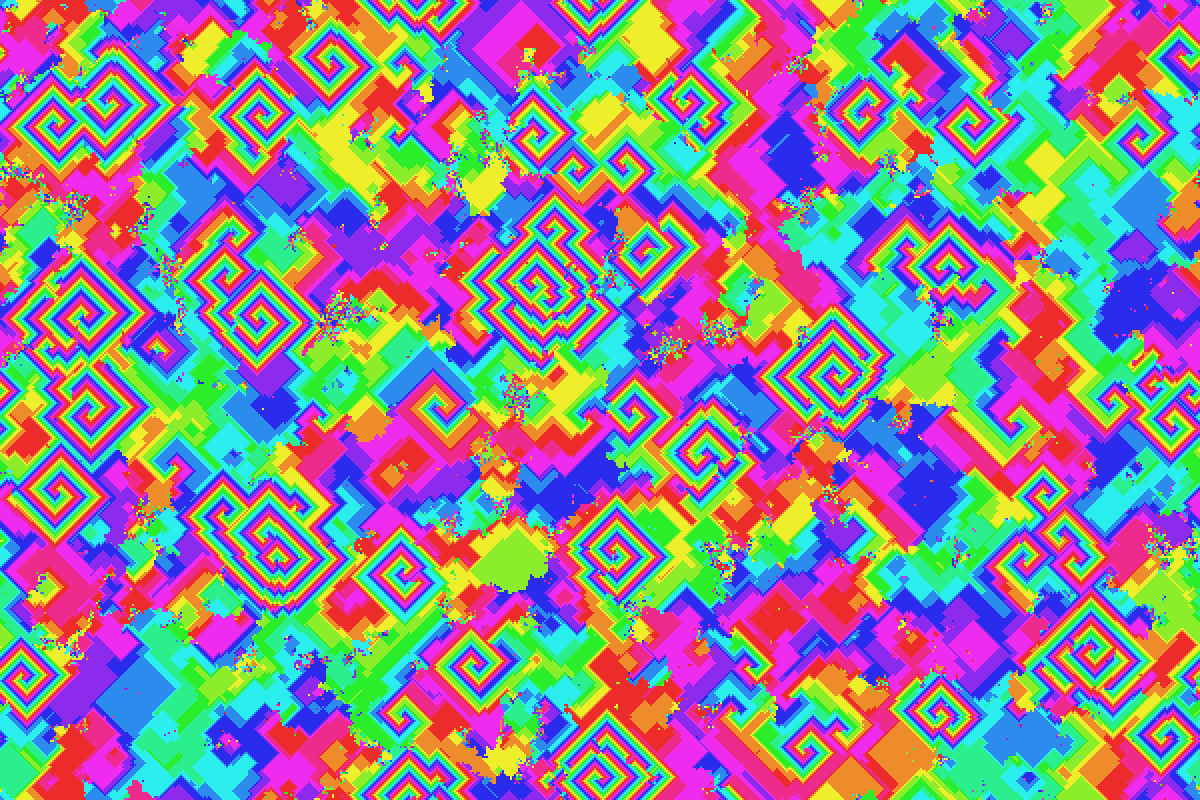
When I ran it, this is what came up on my screen:
Artificial Life
So that is what it was after all!
It was a cellular automaton, the "Griffeath demon" to be precise. One of the examples we saw in the Artificial Life course, which we took as a Biology elective.
Personally, I find this branch of computing fascinating. Given a simple setting and a few very basic rules, watching emergent behaviour appear is remarkable.
In this example the rules are very basic:
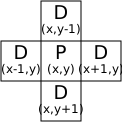

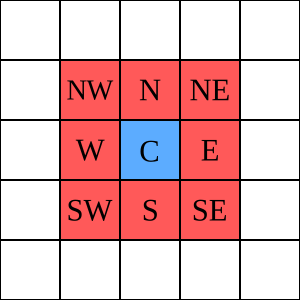

- We start from a two-dimensional board. In the example, 150x150 at most, that is, 22,500 cells. The board is a torus: the cells on the right connect to the ones on the left, and those at the top to the ones at the bottom.
- Initially (generation 0), each cell has a random state, which we draw as a colour. In the example there are 10 states, numbered 1 to 10.
- The colours are ordered as a cycle. 2 beats 1, 3 beats 2, 10 beats 9, but 1 beats 10. Like a circle.
- Each generation is worked out from the previous one, going over the cells. If a cell has in its "neighbourhood" another cell holding the next colour, it takes that colour. The standard neighbourhood is the so-called von Neumann neighbourhood, made up of the cells above, below, left and right. The Moore neighbourhood also takes in the immediate diagonals.
That is all. From there it is a matter of generating a new board for the next generation, painting it, and carrying on to generation 2, 3, and so on.
The result of all this is that patterns emerge out of an initial disorder. Specifically the so-called "demons", cyclic patterns formed by adjacent cells holding, in order, one state of each colour.
Wikipedia describes this phase as the "demon stage": cycles of adjacent cells holding the states in order, turning continuously and sending out spiral waves around them.
But... who is Griffeath?

David Griffeath is an American mathematician, professor emeritus at the University of Wisconsin–Madison, who spent a good part of his career studying how complex structures can arise from extremely simple local rules.
His way of looking at cellular automata is a particularly interesting one. To him, a grid of cells evolving under a handful of rules is a sort of digital "primordial soup": we start from disorder and let local interactions do the work. Out of that can emerge waves, spirals, geometric shapes and even structures that bring living organisms to mind.
Griffeath spoke of cellular automata as "toy universes", and described his method as "thoughtful movie watching": watching the films they generate closely, and using them to discover mathematics.
The life and work of David Griffeath would fill another post, but I cannot leave out that his old personal page at the University of Wisconsin is simply a pea soup recipe.
The demon on a doughnut
When I told my son Biel this whole story, it occurred to him that we could see the board in 3D, as a torus — that is, a doughnut. The 2D board behaves like one anyway, since each of its sides is joined to the opposite one.
My son explains to me that in Blender you can define textures with Python, so we could try generating a dynamic texture with the Griffeath demon.
And so you can. This is the result:
Thank you Biel for the extra geek-out!
Back to the Future
I am very grateful to my friend Jorge for having kept that printed Pascal listing all these years. It has given me back the curiosity, and the patience to do things by hand and with fewer resources. Typing that code again into the Pascal IDE, inside MS-DOS, has been a treat and a proper geek-out.
Now, back to the future — that is, to the present — things are done differently, but the essence is still there: the curiosity and the fascination with emergent behaviour are intact.
So I went exploring how to bring this code up to date and, with Claude's help, I put together a JS version that runs straight in the browser. You can find it in the Projects section of this site.
The app has controls for generating boards with different colours, sizes, neighbourhoods and palettes. I hope you enjoy it as much as I do, and that it gets you looking into Artificial Life!
Come and try Demon.
Comments
Reply on BlueskyLoading the conversation…